Monday
Monday is currently used by the Strategic Team to offer the strategic merchants a more in depth and customisable project management tool. Strategists can tailor the way each board works, specifically for their client's work process. While this is a powerful tool, it has also resulted in an inconsistent experience for developers. With this in mind, we have created a developer specific Kanban board, which will run alongside the Main Table, but use separate status columns, allowing us to have a single, consistent experience for all clients. The developer status column has automations set up to keep the various statuses in sync when changed.
Teams
Teams can be used in Monday to group users together, allowing you to apply permissions to multiple users in one go. Currently two teams have been created; Strategists which contains the Strategic Account Managers, and Strategic Developers which contains the developers for the strategic team. These teams should be invited to all boards, rather than inviting members individually, preventing permissions issues during estimating etc. When a new strategist or strategic developer joins, they should be added to the relevant team, which will immediately grant them access to the correct boards.
Main Table
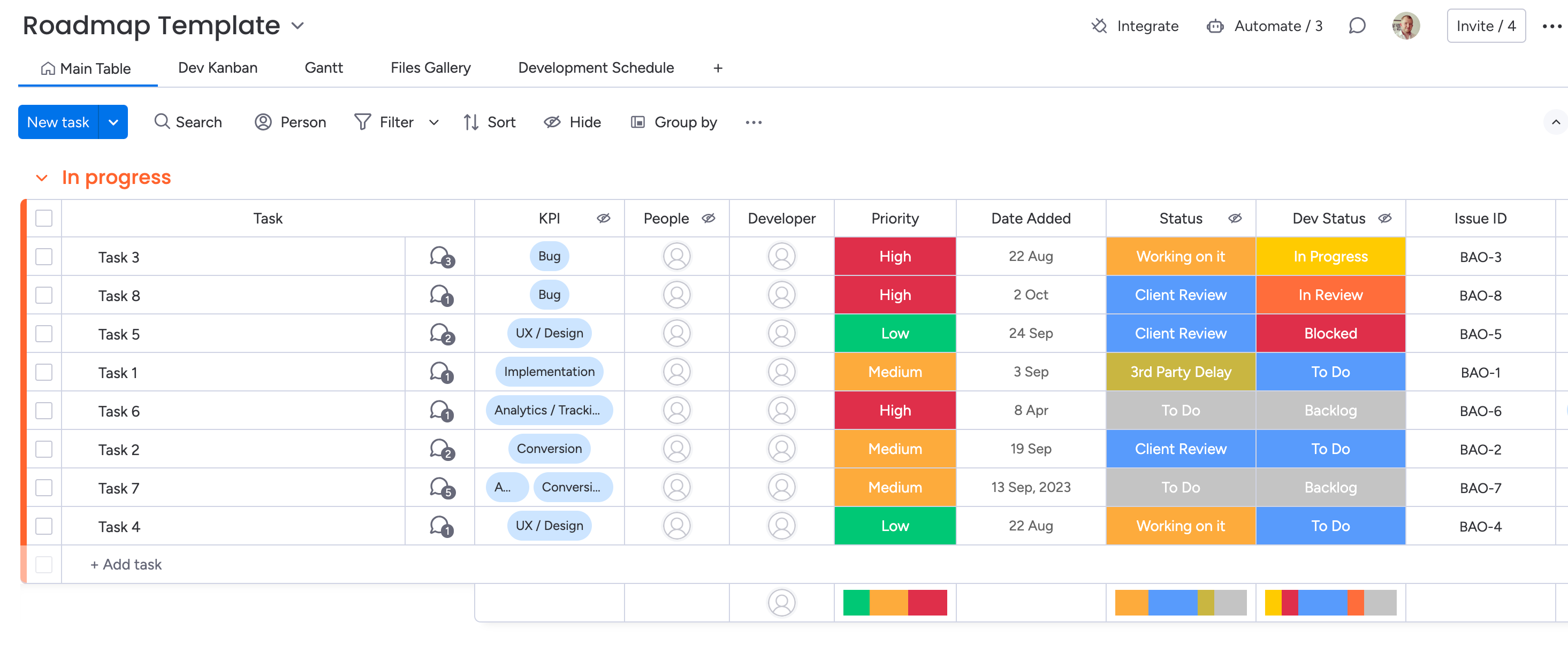
The Main Table is used by the Strategists and Clients to manage their tickets, and can be customised independently per client, to give them the features they need. The Main Table should be managed and customised by the Strategist, and managed in a way which suits them.
Columns on the Main Table can be hidden from certain users, allowing us to provide a cleaner experience for users, where they only see columns relevant to them. For example, the Issue ID, Developer Status and Developer Notes columns are specific to developers, and have been hidden from the client, and likewise the KPI and Status fields have been hidden from the developer.
Kanban
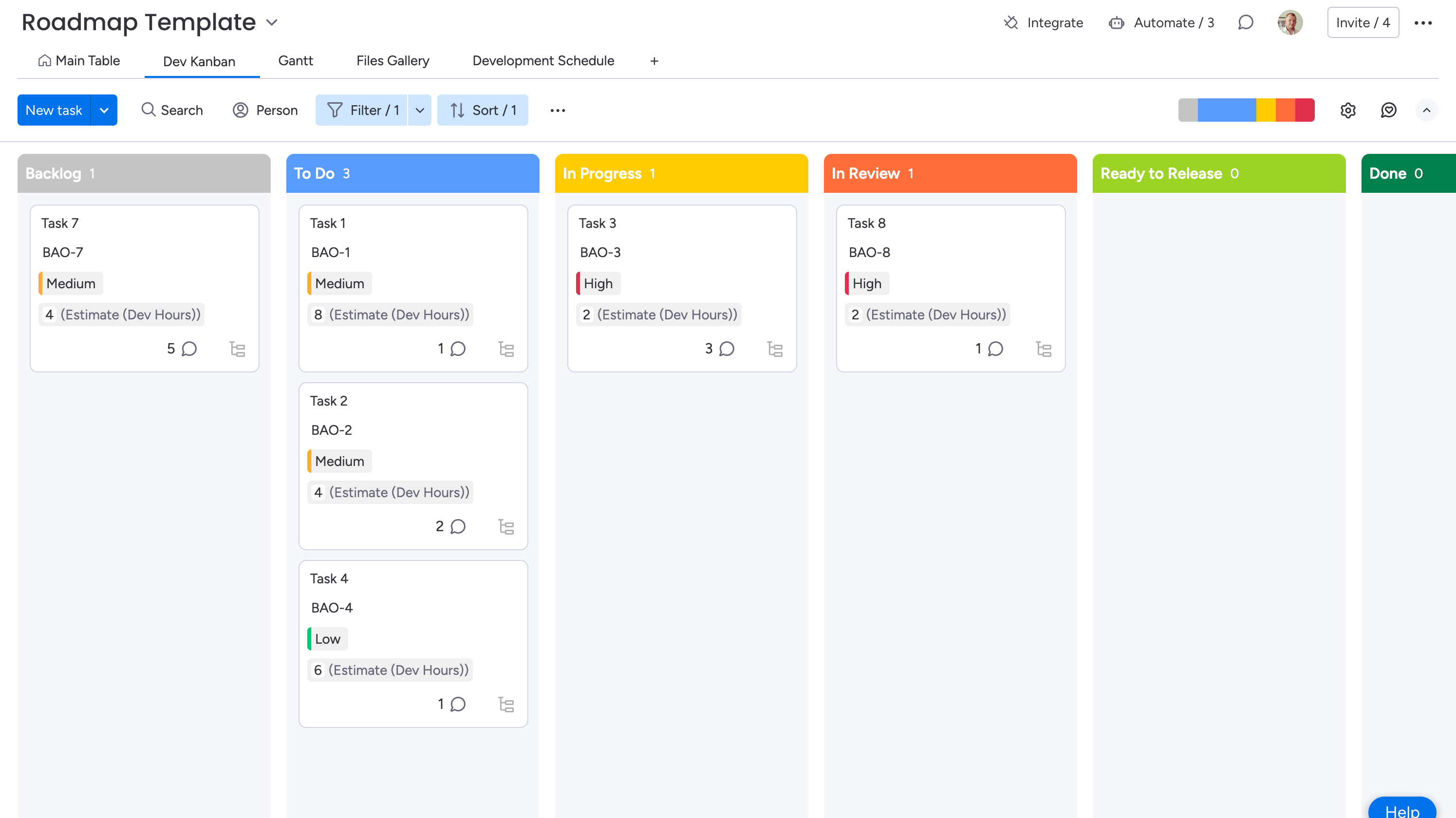
The Dev Kanban board has been designed to create a consistent experience for developers across all clients, whilst not affecting the individuality of each client board. The Kanban board should not be altered by developers or strategists.
Each of the Kanban boards features a filter, which currently filters out any non-dev-related tickets. This means that for a ticket to show on the board, the Department column for the ticket must be set to Dev.
There can be more than one Kanban board in a workspace, always look for the board titled Dev Kanban
Any changes to the Kanban boards should be discussed with the Development Director, and agreed as a team. Changes will then be rolled out across all boards - no board should be altered independently as this will create a fragmented experience.
Columns
There are 7 columns in the Kanban board, which will be discussed below:
Backlog
All newly created tickets will arrive in the backlog. Only tickets set to the Dev Department will show on the board. Tickets in the backlog should not be worked on. Once a ticket is ready, the strategist will alter the relevant column on the main table, which in turn will move the Dev Status to To Do
An Issue ID should be assigned to a ticket as soon as it has been created. If no Issue ID has been added, please create one yourself before starting work, by incrementing the previous ID by 1.
To Do
Tickets in the To Do column are ready to be worked on. The tickets should be ordered in the priority they are meant to be worked on, so a developer should be able to view the board and instinctively know which ticket they need to tackle next. As soon as a developer begins work on a task it should be moved to In Progress.
In Progress
Tickets in the In Progress column are currently being worked on by a developer. The strategist should assign a developer to the task when it is ready to be started, however if no developer is assigned when you begin, you should assign yourself, so other members of the team know who has worked on that task. A ticket will remain in the In Progress column until it has been completed, and tested internally. Once the ticket is ready to be reviewed by a client it should be moved to In Review
In Review
When a ticket is in the In Review column it is ready for the client to review the work. The ticket should contain a preview link, and details of where to view the work, for the client. Once a client has reviewed the task it should either be moved to Ready to Release if it has been approved, or To Do if it requires more work.
We are currently considering adding a Client Feedback column, rather than sending tasks back to To Do
Blocked
A ticket should be moved to the Blocked column if work cannot proceed due to an external influence, such as requiring work from a third party. Tickets can move to Blocked from any other status, and a reason for the block should be specified on the task. Once the ticket has been unblocked it should move back to To Do if more work is required.
Ready to Release
Tickets should only exist in the Ready to Release column once they have been approved by the client. Once the ticket has been released to the live store it should be moved to Done.
Done
Once a ticket has been completed and deployed to the live store, it will be marked as Done. This is the end of the ticket lifecycle. If additional work is required for a completed ticket, a new ticket should be created. You can reference the completed ticket for added context, but should not re-use the original ticket.
Tickets
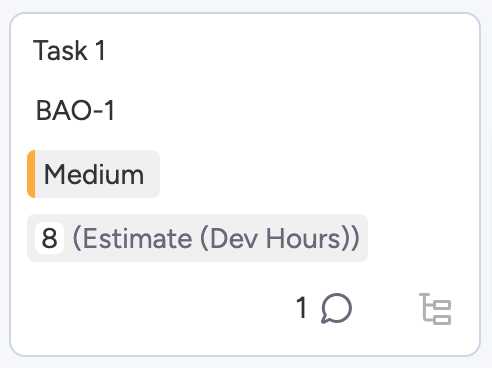
The tickets on the board can vary slightly depending on the client - some do not have a priority column for example, however they have been made as consistent as possible. All tickets will contain the following information where possible:
- Ticket Name
- Priority
- Issue ID
- Estimate
- Deadline
- Developers
Developer Notes
All tickets contain a Developer Notes field on the left, which is hidden from the client. This can be used to provide handover notes, the Git branch, or a link to the PR, where the developer feels it is needed.
Feedback
If you have any comments or suggestions, please raise them with the Development Director for discussion.