Time Tracking
Harvest
When questioned by our merchants regarding deliverables and outcomes, a key instrument in our repertoire is the ability to demonstrate applied resources. Harvest, our designated tool for time tracking, enables us to achieve this effectively.
It is important to emphasise that this time tracking is not intended for any form of intrusive monitoring but rather to quantify our work, safeguard our collective interests, and refine internal processes. Should you have any concerns or queries, please do not hesitate to contact me. Thank you for your cooperation in this matter.
Chrome Extension
We have developed an internal version of the Harvest extension for Google Chrome, which automatically identifies the correct client and project while pre-populating the description field with the title of the ticket being worked on. This extension is fully compatible with Basecamp, Asana, and Monday, and it is BAO's chosen method for recording your time.
To install the extension, please follow the instructions provided here:
https://github.com/baoagency/harvest-extension
This extension should be the only method used to track work, to ensure the consistency of the time tracking reports. Please remove any other tracking tools.
Strategic & Production Retainers
As part of these service offerings we conduct monthly reports. The time you log on retainer days will contribute directly to these reports; therefore, it is essential that all logged time is clear and accurate. Please adhere to the following steps when tracking your time in Harvest:
When tracking work associated with a ticket:
When starting a task, navigate to the relevant ticket and click the  Harvest icon located in the Chrome toolbar.
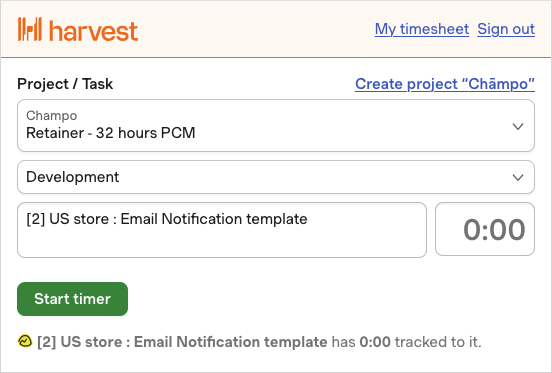
The Chrome extension will attempt to automatically populate the required fields; however, you should verify that the information is correct:
- Client: The extension will infer the client from the URL
- Task: The default task is set to ‘Development’; however, this should be amended if another task is more appropriate
- Notes: The extension will pre-fill the notes field with the task estimate and title, and will also link the task to the current page URL
When tracking time without an associated ticket:
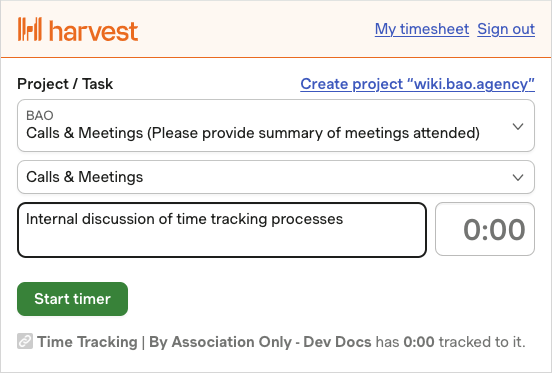
In certain instances, such as meetings, you may need to log time without an associated ticket. In such cases, the following fields must be completed manually:
- Client: Specify the client related to the meeting or task. For internal meetings, select 'BAO Calls & Meetings'
- Task: Select the most appropriate task. For meetings, choose 'Calls & Meetings'
- Notes: Enter the topic or purpose of the meeting or task
Ensure that you stop the timer upon completing the task to record the time accurately. If you forget to stop the timer, you must adjust the time retrospectively to ensure it reflects the duration of the work accurately.
Capital Projects
Time logged against capital projects is utilised to determine how long projects take to complete, enabling us to budget accurately for future initiatives. When starting your timer, please ensure that the following information is included:
- The client and task
- A general summary of the work undertaken
- For substantial tasks, the Basecamp task name (where applicable)
Meetings
Meetings, whether scheduled or unscheduled, are an unavoidable aspect of agency operations. Please adhere to the following guidelines:
- For calls or meetings related to a specific merchant, log the time against that merchant
- For internal meetings, log the time under the 'BAO Calls & Meetings' project
You can link your Google calendar with Harvest, allowing you to more easily track meetings. See below for details.
Linking Google Calendar
Linking your calendar to Harvest allows you to add meeting timesheet entries with a single click through the website. Please note, at the moment the Chrome extension does not have this ability, but we are investigating whether it can be added.
To link your calendar:
- Click your profile in the top right, then click My Profile
- Navigate to the Security section
- Click Connect next to Google Calendar
- Sign in to your Google account and ensure you allow both requested permissions
Once your calendar has been linked a new sidebar will open when tracking a time event. This will list all events in your linked calendar, clicking it will prefill the notes and time fields. You must still select the relevant client.
Deployments
Deployments often happen outside of a client's retainer day, so need to be tracked to ensure we are accurately recording the time used. A new task of 'Deployments' has been added to each client. When tracking deployments you should provide a brief summary of the items that are being deployed.
Annual Leave and Sick Leave
To aid the weekly reviews we are asking employees to track time out of the office; this should ideally be added before you go away, but can be be added retrospectively on your return if necessary.
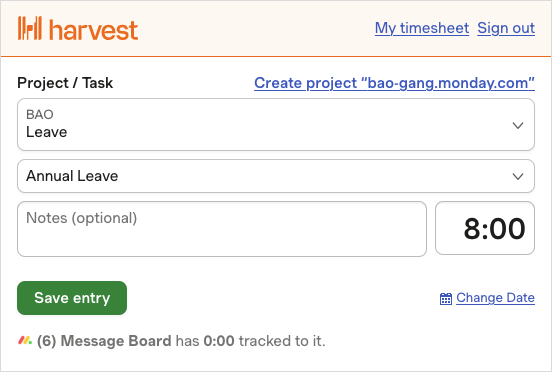
This time should be tracked against the Leave project in the BAO client. Please select the appropriate task - Annual Leave or Sick Leave, depending on your time off.
For full days of leave please track 8 hours, for half days track 4 hours, and for anything less please enter the time to the closest hour.
The notes field can be left empty.
Weekly Reviews
Each team will have a designated member responsible for ensuring the accurate recording of time. At the conclusion of each week, they will review the team’s timesheets and prompt any members with missing entries to update their timesheet in Harvest. In turn, they will share the team's performance with their line managers.
The individuals responsible for this task are as follows:
- Production - Matt England
- Strategic - Sam Wood
- Build - Simon Bird
- Design - Jack Richardson
- Tech - Mike Moore
Developers are responsible for tracking their own time - it is not the responsibity of Project Managers, Account Managers or Account Strategists to chase you.